You can now lock Windows 11 from Android remotely, send files to PC, share clipboard, mirror screen, and more
हिंदी में सुनें
Listen to this article in Hindi
Microsoft's Link to Windows app on Android gets a major upgrade. Remotely lock your PC, transfer files, share clipboard, and mirror your screen!
Microsoft has quietly rolled out a significant update to the “Link to Windows” app on Android, starting December 8th. Version 1.25102.140.0 brings the ability to remotely lock your Windows 11 computer, transfer files between your phone and PC, and even share your clipboard between devices.
The update, which Windows Latest first reported, enhances the Link to Windows experience, which has been around for a decade and is integrated into phones from manufacturers like Samsung.
Previously, the Link to Windows interface offered basic functionality, primarily allowing users to manage connected PCs by connecting or disconnecting them. Controlling Windows 11 from the Android app wasn't possible, as features were managed directly on the PC.
Version 1.25102.140.0 changes this. Tests conducted by Windows Latest reveal a redesigned interface and new controls for managing the connected computer directly from the Android app. The update is available to all users without needing to join the Windows Insider Program or download a beta app.
New Features in Link to Windows
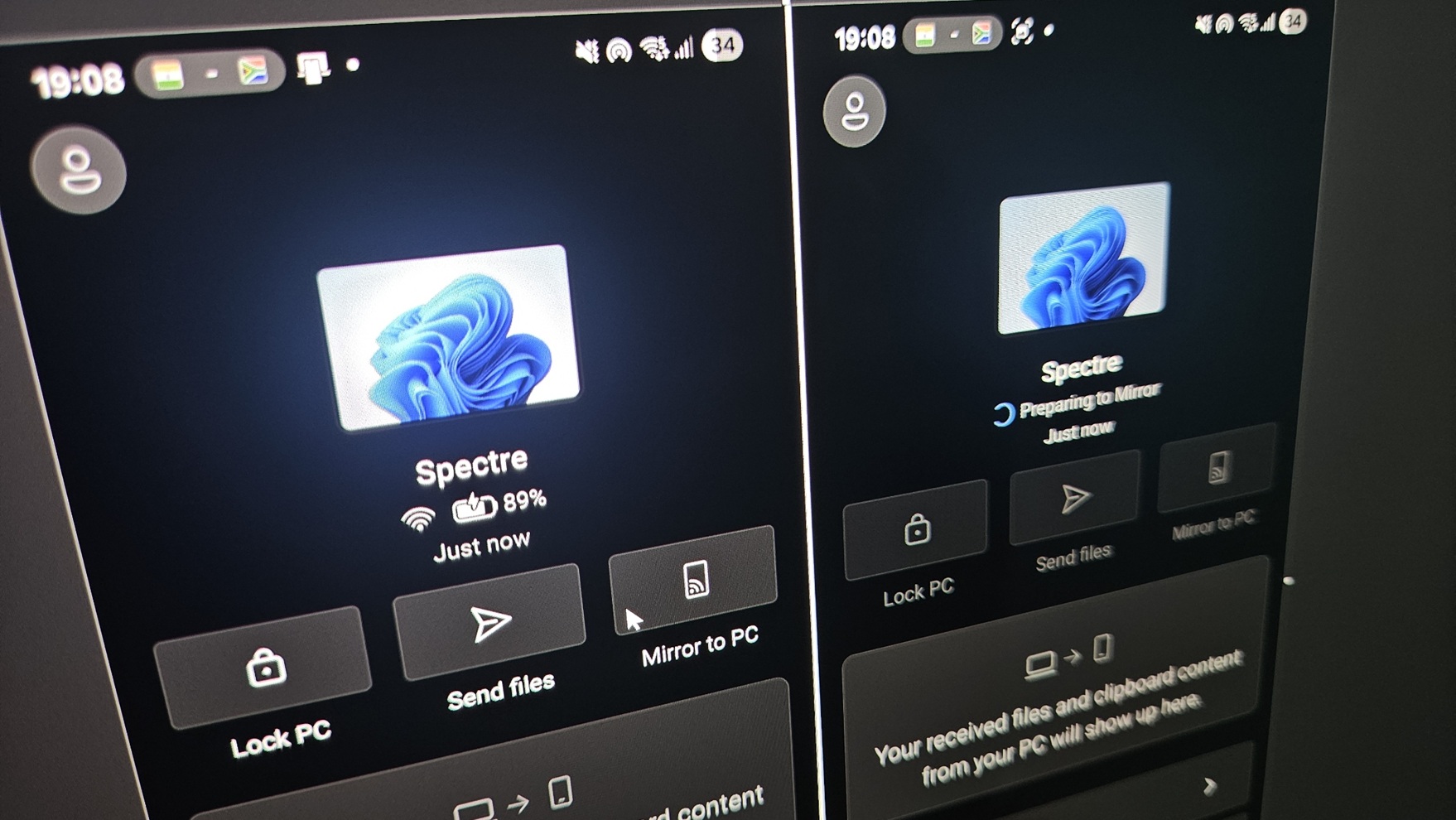
**PC Status:** You can now view your PC's battery level (for laptops) and internet connection strength directly from your Android device. The battery level syncs almost in real-time. While network strength is displayed, managing features like volume or Bluetooth, and advanced options like night light, are not yet available.
**Recent Activity Feed:** A new “Recent Activity” section logs your interactions. For instance, files sent using the new file transfer feature or files sent from Windows 11 via the “Send to my phone” option will appear here. Clipboard items copied on your PC also sync to the Link to Windows app and are displayed in the Recent Activity feed.
**Remote PC Locking:** A new “Lock PC” toggle allows you to remotely lock your computer from your Android phone, provided they are connected. Activating this feature disconnects the devices, but proceeds to lock your PC. Tests indicate a near-instant locking time of under three seconds. Once locked, unlocking your PC automatically reconnects it to your phone. This is useful when stepping away from your computer.
**File Transfers:** While transferring files from PC to phone was already possible, the update adds the ability to send files from your Android phone to your PC. The file transfer experience is comparable to other wireless solutions like Google Nearby. To send files, tap “Send files” and select them from your gallery or file manager, or capture a new image. Transferred files trigger a Windows 11 notification with options to open the file or locate it in File Explorer. Files received from your PC now appear on the Link to Windows app homepage for easy access.
**Clipboard Sharing:** The updated app includes a clipboard feature for cross-device copy and paste. Once enabled in Windows Settings (Bluetooth & Devices > Mobile devices > Managed devices), anything copied on your Windows 11 PC is automatically synced to your phone’s clipboard, including images. The Link to Windows app maintains a clipboard history, allowing you to delete or share items with other apps.
**Screen Mirroring:** A new “Mirror to PC” or “Cast to PC” toggle in the Link to Windows app allows you to quickly mirror your Android phone's screen to your PC. This provides the same screen mirroring experience as before, but can now be initiated directly from your mobile device. Microsoft is also testing an “Expanded” mode for screen mirroring, which allows Android apps to utilize more screen space, especially useful for apps with tablet UI support.
This update suggests Microsoft is shifting towards a more balanced approach, where your phone can control and manage aspects of the Windows connection, reducing reliance on the Phone Link app on the PC. While Phone Link isn’t disappearing, some features like the Photos section are moving to File Explorer. These new features are available in Link to Windows for Android version 1.25102.140.0 and Windows 11 versions 24H2 or 25H2.