Oppo Find X9 Pro Review: This Phone Rocks for Photography
The Oppo Find X9 Pro is an excellent, versatile smartphone for photographers. It has great creative features and top-notch cameras.
Come in for the camera but stick around for the battery life. That’s one way to sum up the Oppo Find X9 Pro, a flagship smartphone that makes a strong case for being one of the top three in the world. And with a global version available, this is the kind of device that makes you think about how much you’ve been missing from the average flagship in North America.
Oppo is a Chinese brand maintaining a collaborative partnership with Hasselblad, and as the parent company to OnePlus, shares much of the same research and development. The Find X9 Pro is, in many ways, a counter to the OnePlus 15 because of the camera disparities between them. And while it’s not available directly in North America, it’s now being sold in various Western markets, including the U.K.
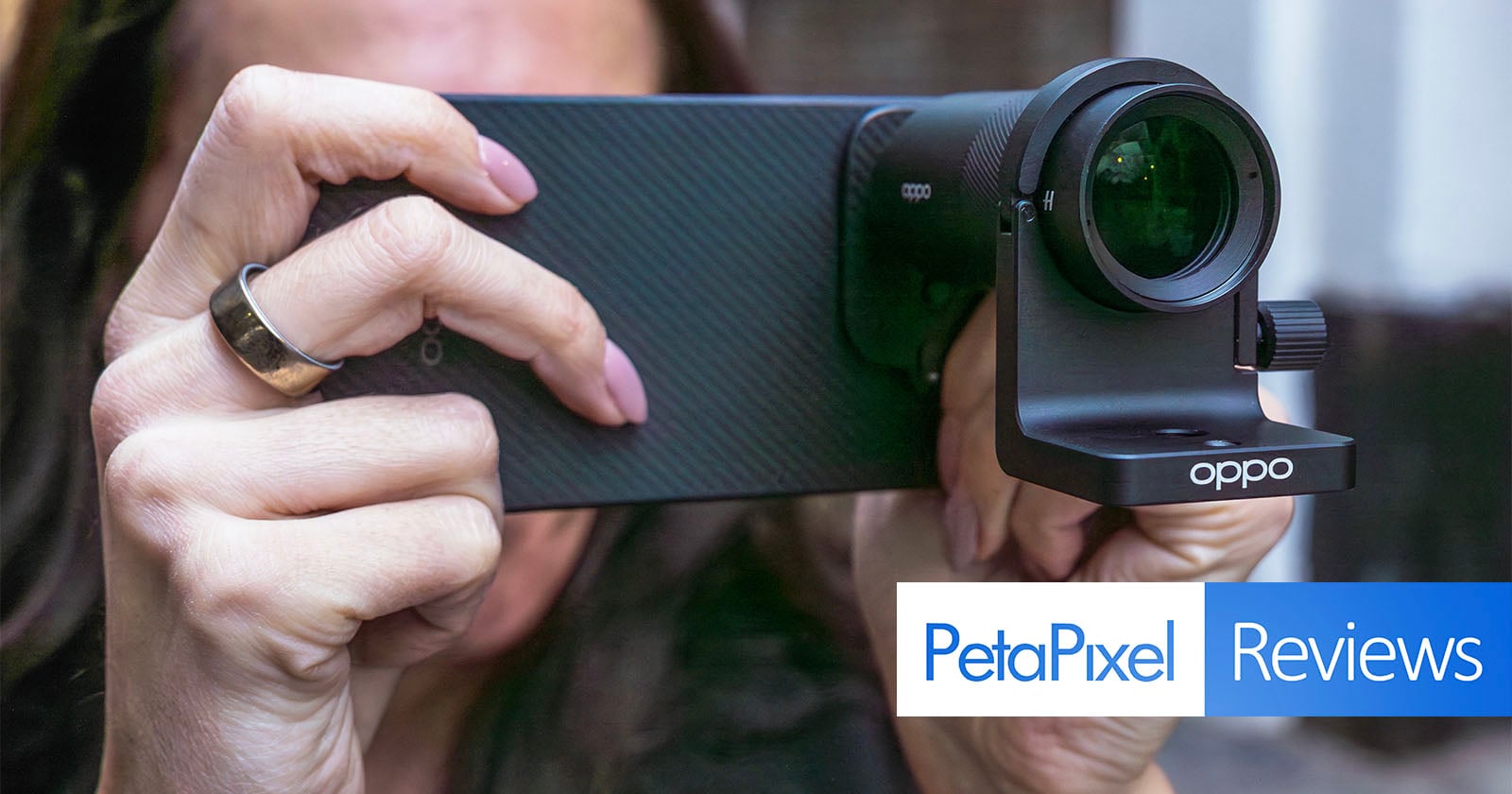
Throw in a photography kit that includes a Hasselblad teleconverter lens, mount, and magnetic case, and there are further ways to explore what this device can do.
Oppo Find X9 Pro Review: Design and Build
The camera lens cutouts are different, but the rest of the device looks like it came from the same assembly line as the OnePlus 15. Sharing resources isn’t new for these two brands, but like that device, I feel like this one lacks imagination in its design.
Both use the same 6.78-inch LPTO display (2772 x 1272), though since Oppo doesn’t focus on gaming the same way, its screen maxes out at a 120Hz refresh rate. Still a gorgeous screen, and a bright one at 1800 nits (3600 peak brightness), along with a highly responsive fingerprint sensor. The overall frame and dimensions are almost identical between the two, with only a slight weight difference, partly owing to the larger battery and optics inside.
From the IP68/69/69K dust and water resistance and on to the placement of buttons, antennas, speakers, card slot, and microphones, they are essentially carbon copies of each other. The one difference is that Oppo includes the Quick Button, which feels a lot like a clone of the iPhone’s Camera Control to launch the camera and adjust zoom via haptics. This isn’t a new addition, having been included in the previous model, but it’s something not typically seen in Android devices on this side of the globe.
Like OnePlus, Oppo chooses not to integrate MagSafe into the phone itself but rather leaves it to cases to do the job. The photography kit’s magnetic case gave me the opportunity to use MagSafe accessories with it myself, yet I am still left curious as to when Oppo might finally just build it into the device.
Where the phones diverge further is in hardware under the hood. While the OnePlus 15 runs on a Snapdragon 8 Elite Gen 5 chip, the Find X9 Pro goes with the MediaTek Dimensity 9500. Both have huge batteries, but with a slightly bigger 7500mAh battery onboard, there’s just a little extra juice here.
It also charges quickly, though it doesn’t come with a charging block like the OnePlus 15. It can go as high as 80W, charging from empty to 100% in about 30 minutes, which I can confirm is true when using the OnePlus 15 charger. Plug it into a 65W charger, and you’re still under an hour to get back to full strength.
Configurations start at 12GB of RAM and 256GB of storage, going all the way up to 16GB of RAM and 512GB or 1TB of storage.
Oppo Find X9 Pro Review: Camera Features
The camera specs tell a very different story underneath, only adding to the scrutiny of what OnePlus was thinking when crafting its latest flagship.
The 50-megapixel (23mm equivalent) main camera uses a larger Sony LYT-828, a Type 1/1.28-inch image sensor with an f/1.5 aperture. Pixel binning brings those down to 12.5 megapixels, save for the Hasselblad Hi-Res mode. RAW and 14-bit RAWMax photos are stuck at the lower resolution in Master mode for some strange reason. That also goes for 50-megapixel images using the telephoto camera, despite that being a pixel-binned setting unto itself. Mind you, there is another way to activate higher-res capture (for JPEGs) that I’ll touch on further down.
The 200-megapixel (70mm) telephoto uses a very capable — and noticeably bigger — Samsung Isocell HP5 Type 1/1.56-inch sensor with considerably wider f/2.1 aperture. That makes the 3x optical zoom wider than the 85mm range on the OnePlus 15, but you can get a crop that matches it by tapping the 3x button onscreen a second time. The 6x hybrid zoom is a 140mm equivalent that holds its own, though it also introduces more software processing.
Ironically, the 50-megapixel ultra-wide (15mm equivalent) uses the same Samsung JN5 Type 1/2.76-inch sensor as the OnePlus 13, including a decent f/2.0 aperture and 120-degree field of view.
The JN5 reappears with a 50-megapixel front camera (21mm equivalent) featuring a f/2.0 aperture, autofocus, and electronic image stabilization.
Of all these lenses, Hasselblad clearly had the most input on the telephoto, since it’s the only one that works with the photography kit’s teleconverter. When attached, the external lens sets the focal length to presets such as 230mm, 460mm, and 920mm.
Oppo Find X9 Pro Review: Extending the Reach
I had the chance to test Oppo’s Hasselblad-branded photography kit around the same time I was still using Vivo’s own for the X300 Pro. The most significant difference is Oppo treats its kit as nothing more than a means to extend the reach of the Find X9 Pro’s telephoto camera. While that’s also the case for Vivo, it also enables you to use the full breadth of the camera app’s modes and settings, whereas you simply can’t with this phone because Oppo’s app treats the teleconverter as a mode unto itself.
It’s my one major gripe with Oppo’s implementation, and something I hope it rectifies with a software update and a more refined mounting bracket. I just find it silly that I can’t shoot in RAW, full-res JPEG, or Hasselblad’s own XPan mode when attaching it. Moreover, it bafflingly removes Action mode as an option when the lens is active, making it harder to freeze action in place.
This is evident in fast action shots I took at both an NBA and an NHL game. Shooting handheld at 230mm without a grip is tough, but what makes it worse is the limited alternative options. The photo above, where Columbus Blue Jackets’ forward Adam Fantilli is about to score an overtime winner against Joseph Woll of the Toronto Maple Leafs, is a nice shot, except I had to try getting it by taking a motion photo (which records in 4K now, by the way). Woll is in focus while Fantilli isn’t. It’s not just that I couldn’t utilize Action mode here, Oppo also inexplicably disables burst shooting when the lens is attached.
Either recourse would’ve likely increased the shutter speed beyond the 1/141 I got with a straight or motion shot from the regular Photo mode. It probably would’ve also raised the ISO to compensate, but I’m personally willing to take the risk of a little more noise to freeze a pivotal point in any game.
My other issue is that Oppo omits part of the kit for specific markets. Some in Asia get the grip, whereas others don’t. I used a ShiftCam Snap Grip Pro as a solid workaround, but it’s hard to reconcile Oppo’s assertion that the Quick Button’s position makes the ergonomics work despite the grip’s absence. I find it more unwieldy without one when the lens is attached, due to the weight distribution and placement of the shutter buttons.
The good thing is the slide-in bracket lens mount is easier to manage than Vivo’s ring mount, except you can’t leave the bracket on after removing the teleconverter because it blocks the other two rear lenses. This means you have to attach two pieces to utilize it instead of one — and be mindful not to misplace or lose the bracket in the process.
The teleconverter itself is a solid piece of gear with metal and glass, indicating the kind of quality both Oppo and Hasselblad pursued with it. It’s easy to attach and detach, and I use a non-supplied microfiber pouch to keep it clean and scratch-free when taking it with me. And despite my concerns with its implementation, it proves more than capable of taking the already excellent telephoto camera and making it even better. Image stabilization is fantastic, and the color science doesn’t take a big hit, either.
While it can’t focus as close as 20cm like Vivo’s lens can (in most instances), you could get some decent close-ups of certain subjects from about 100-150cm away. And without a grip, you have to use the lens mount adapter to screw it onto a tripod. It works, but it also shifts more of the weight onto the lens, so sliding it in the right place makes a difference. Third-party magnetic grips have standard mounts as well, presenting an alternative.
Pricing information is a little vague, but expect the kit to add another $500 to the phone’s price if you go with it. Other third-party lenses are out there for less, but this teleconverter is proprietary, and I suspect it will be compatible with newer Find X models.
Oppo Find X9 Pro Review: Same Old Camera App
Looking at the camera app will be all too familiar for any OnePlus user. It’s the same interface, albeit with slight differences courtesy of Hasselblad’s remaining presence. The Underwater mode introduced in the OnePlus 15 is the same here, as are basically all the other modes the two devices share. The main difference is in the software processing, color science, and role Hasselblad plays in both those elements.
That’s why, in many respects, the Find X9 Pro feels like more of an imaging evolution of the OnePlus 13 than the 15 does. It also explains why photos don’t appear as soft and why colors look more lively and lifelike, particularly with the main and telephoto cameras.
I didn’t get any verification on this, but I believe burst shooting sticks to 6 fps, which isn’t quite as fast as the 10 fps I was able to capture with the OnePlus 15. The same dual exposure algorithm, which simultaneously captures a short and long exposure to freeze a subject, applies here, even if Oppo doesn’t call it that.
Like OnePlus, a new set of film-inspired filters enters the fray in most modes, along with three profiles (misty, glowing, dreamy) to influence the final composition. The Retouch settings are unsettling for how much they can manipulate one’s skin or facial features, but they’re also common with Chinese-branded phones.
Oppo Find X9 Pro Review: Where the AI Steps In
Yet again, like the OnePlus 15, there’s the Snap key on the left edge that can activate the Mind Space platform, a repository for any content you capture through screenshots, produce as notes, and record as voice notes. This feature ties into Google Gemini to help provide context or piece together details you’ve added so you’re not searching for specifics when your information piles up.
This can include photos you’ve taken that may be related to either something you’re researching, a project you’re working on, or an event you’re planning. It’s early days so the utility of such a feature is probably more task-based than an everyday resource right now.
The AI Editor within the Photos app has semantic differences. Here, it’s AI Relight rather than AI Portrait Glow, Enhance Clarity over AI Detail Boost, and Remove reflections over AI Reflection Eraser. In practice, the features all go to the same cloud, which explains why results don’t differ all that much compared to the OnePlus 15.
Then there’s the broader software picture. This phone runs on ColorOS, which bears similarities but also holds a distinct identity from OnePlus’ OxygenOS. Oppo not only went for a more iPhone-esque look on the outside, but its Android overlay also takes several cues from iOS. You can tell just after using it for 10-15 minutes. The animation, icon styles, app layouts, and personalization tend to follow this direction. Not to mention the same O+ Connect app lets you connect with both iOS devices and Macs.
Oppo Find X9 Pro Review: Image Quality
Hasselblad Keeps it Going
Hasselblad’s presence is evident because the color science and processing are both familiar and convincing. It looks like an evolution of what came before, rather than a lateral shift forging a different path (a la OnePlus). And while the phone draws inspiration from competitors like Apple, the Find X9 Pro’s camera array humbles the iPhone in many respects. It routinely outperformed the iPhone 17 Pro across a variety of settings, most notably in white balance, action shots, telephoto, and macro photos.
Plus, there’s an option to enable the main camera to take photos at 50 megapixels by default. You have to toggle this on under Settings->Format->High Resolution in the camera app, where it will then capture a photo at the higher resolution when the lighting is most optimal. This usually happens in daylight, but you might see it indoors if it’s really bright. The thing is, the app never tells you, so when you check the metadata later, you may find some photos at 50 megapixels, while others are at 12.5 megapixels, despite both being in the same place.
The industry trend, at least for a good portion of brands outside North America, is to prioritize realism and lean a little more into the nuances of film. That’s evident here, though it also matters what you’re taking a photo of and with what lens. Processing takes a starker position when using the hybrid zoom crop factors, especially with the telephoto lens at 12.5 or 50 megapixels. The main lens does right by the 28mm and 35mm crop factors, whereas you’ll notice the effects a lot more at the telephoto sensor’s 140mm and 308mm crops.
The processing can also be inconsistent in color and saturation depending on the lighting. Low-light situations often lead to more muted tones, whereas better ambient lighting brings out the subjects’ colors more. Fortunately, some editing in the photo gallery can fix many of these instances.
Dynamic range is excellent throughout, as are the details within the photos. You can turn off Auto HDR if you want to try dialing back any excess, but only shooting in RAW in Master mode can hold off all processing. That said, having also come from the Vivo X300 Pro using the same MediaTek processor, it’s not surprising the imaging pipeline feels similarly effective here.
Telephoto
A 200-megapixel sensor sounds big on any spec sheet, though you’re not likely to use it as much unless conditions are optimal. Instead, you’ll probably shoot at 50 megapixels more often as a balanced way to get more detail without sacrificing too much light-gathering.
Regardless of resolution, the telephoto proves itself versatile. I would argue Vivo does a better job producing more details and freezing action from a distance, but there’s a lot to like about how photos turn out here. Especially when comparing results to what Apple, Samsung, and Google routinely deliver with their flagships, the Find X9 Pro feels like it’s way ahead.
That includes hybrid zoom images as well, though this is where caveats roll in, as you might expect. While you can get a really good shot at 6x zoom (308mm), you will see muddier edges and muted colors. Since this is usually just cropping in from a pixel-binned sensor, there is a bit of timing and luck that goes into nailing an amazing shot. Oppo even enables you to zoom all the way to 120x (2800mm), where onboard AI kicks in to clean things up, but it’s generally pointless given how images come out looking messy and overprocessed.
Macro shots look fabulous, given that the telephoto lens can focus as close as nine centimeters (3.5 inches). My one complaint is that I couldn’t do anything about the bokeh effect. I really like the ladybug shot, but the focal plane is pretty thin across the frame, making it look a little like a tilt-shift image and posing potential problems when part of the subject is out of focus.
It’s just unfortunate there’s no way to take 50-megapixel RAW photos — a feature Apple, Samsung, Google, Xiaomi, and Honor all offer. At the same time, the teleconverter is a game-changer when used with the optics to achieve better results at longer ranges.
The ultra-wide camera is quite good, which I would expect given it’s a common sensor used by different brands. Oppo does right by this one, delivering good, consistent output across varying scenarios.
Video Features
Oppo takes a similar approach to OnePlus in rearranging certain features to up its game on the video side. Pro Video mode offers manual controls, including LOG recording. In both Pro and regular Video mode, you can record in 4K at 120 fps. The biggest difference, again, is that Hasselblad’s influence comes into play here, so footage doesn’t come out looking the same as it does on the OnePlus 15. All told, this is a dependable device for video thanks to excellent results from all three rear cameras.
Oppo Find X9 Pro Review: A Serious Contender for Photographers
There’s more room for creativity in the Find X9 Pro, especially when you factor in the Portrait and Long Exposure modes, along with the myriad of manual controls and settings that make this one of the most fully-featured mobile camera systems around. Getting one in North America is tougher because you have to import it, and while there may be limits on carrier-band compatibility, my experience is that phones like this work fine on this side.
It’s also pricey if you want both the phone and the photography kit. The phone sells in Europe for 1300 Euros, while the kit’s true cost remains unclear. For what it’s worth, Oppo guarantees five years of Android and security updates.
Oppo and OnePlus clearly decided to split the focus with their flagships this time. The OnePlus 15 is the gaming one, and the Find X9 Pro is the camera one. This strategy is off to a rocky start for OnePlus, coming on the heels of its best all-around device, the 13. For Oppo, it’s a continuation of a photography-centric approach that’s producing results.
It’s also further proof that mediocre phone photography need not be acceptable at this level. The more I shot with this and the iPhone 17 Pro at the same time, the more glaring the contrast between them. The Find X9 Pro was simply more resourceful and realistic. Its white balance is more neutral compared to the overtly warm tones Apple’s flagship kept producing. Its details and color are more striking. I shocked many when taking the same shot with both right in front of them. The iPhone still gets the nod for video, though.
If I’m to also throw in the benefits of the incredible battery life, reliable performance, and superb hardware, it’s hard to find fault with something this robust.
Are There Alternatives?
If you want something similar, though not quite as advanced, the OnePlus 13 remains a stellar option at more of a bargain by comparison. The Nothing Phone 3 is another option if you want to go with a brand that tries things more than Samsung and Google currently do.
The Google Pixel 10 Pro recycles camera hardware, focusing more on AI-driven features and computation to define its camera experience. The Samsung Galaxy S25 Ultra is still out but its successor is coming early in 2026, and it will be very interesting to see if the company makes mobile imaging more of a priority this time.
To me, the Vivo X300 Pro is the best phone of the year if we’re ranking phone cameras. But Oppo makes a strong case for being close to the top with this effort. The Xiaomi 15 Ultra also remains one of the best in the business, and that’s another brand set to launch its next flagship in Q1 2026. Honor will be doing the same with its new flagship, the Magic 8 Pro.
Should You Buy It?
Yes. You won’t regret it. The combination of imaging capability, battery life, performance, and software customization makes this more than just a phone that takes great photos.